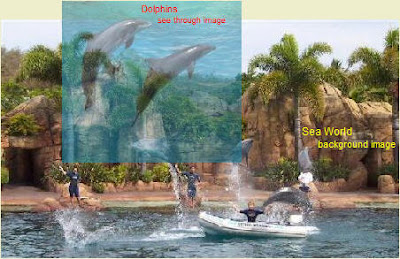
Save this jpeg picture "dolphins.jpg" to your "Pictures" folder.

Open Paint Shop Pro.
Open "dolphins.jpg" in PSP.
Click "Layers", "New Mask Layer", "Show all". 
A window will appear. Choose "OK".
You will see a "Mask" layer and a "Raster" layer appear on the right in the "Layer" window.
"Mask - Raster 1" will be highlighted. Leave it. 
Click "Layers", then "Properties".
A window appears with a "Overlay color" on the left and the "Opacity" rate in percent on the right. 
Changing the color on the left will not make any difference.
Changing the opacity will, but leave it at 50%.
Click "OK".
Choose the "Flood Fill Tool" in the Toolbox on the left.
Place the curser over the picture and click the left mouse button three times.
You will see the picture become more transparent with each click.
Sometimes for some unkown reason this multi-click function will not work. There is a way around this. Click "Layers", "Properties" and "General" tab, as above. Then Choose the transparency (Opacity) you want - say 50%. Click "OK". Go ahead and use the "Fill" tool to make the image transparent.
Go to the top and click "PNG". "Transparency" tab, then "Alpha channel transparency".
Click the "Download Times" tab and you will see a download time of 14 seconds for a dial-up 56k connection. This is quite high, but with PSP you cannot make it any smaller with the transparent properties.
Click "OK" and save it as "dolphins2.png"
Preview it.
You will see that the image is transparent.
Load the dolphin.jpg image.
Double left-click the top color.
Select a shade of gray, say R.192, G.192, B.192.
Go to "Layers, "New Mask Layer" and click "Show all".
Left click the image with the "Fill" tool.
Save it as a PNG image with "Alpha channel transparency" ticked.
There you are!
Why doesnt PSP tell users that the program will create transparent images?
It would certainly help sales if they did.
And by the way. Get yourself and older Jasc Paint Shop Pro 8 version. The only bug when running it on Vista and Windows 7 is you have to begin cropping an image from the bottom right to top left. Resize any picture you are working on in this way.
The new PSP software by Corel is rubbish.
P.S. To make the multi-click function work:
Download the Filters which are a set of 9 bmp images.
Put the images in the "Texture" folder of PSP8.
Before you select "Layers", "New Mask Layer", "Show all" do the following:
Choose a main color like "blue".
Double left click the top color in the "Materials" window.
Tick "textures".
Choose Filter 40.
Then do "Layers", "New Mask Layer", "Show all" and continue.