Pages

Showing posts with label a. Show all posts

Wednesday, July 16, 2014

How to Make a Transparent Image See Through for a Website with Paint Shop Pro PSP

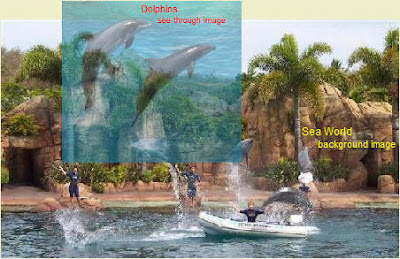
Make a transparent see through image.


You are frustrated because you want to make a transparent image for a website and a Google search has many suggestion, all escoteric about special html and java. All the while Paint Shop Pro is quite capable of producing a picture that you can see through quite easilly. Make a PNG image.


Save this jpeg picture "dolphins.jpg" to your "Pictures" folder.


Open Paint Shop Pro.
Open "dolphins.jpg" in PSP.


Click "Layers", "New Mask Layer", "Show all".
A window will appear. Choose "OK".
You will see a "Mask" layer and a "Raster" layer appear on the right in the "Layer" window.
"Mask - Raster 1" will be highlighted. Leave it.
Click "Layers", then "Properties".
A window appears with a "Overlay color" on the left and the "Opacity" rate in percent on the right.
Changing the color on the left will not make any difference.
Changing the opacity will, but leave it at 50%.
Click "OK".


Choose the "Flood Fill Tool" in the Toolbox on the left.
Place the curser over the picture and click the left mouse button three times.
You will see the picture become more transparent with each click.


Sometimes for some unkown reason this multi-click function will not work. There is a way around this. Click "Layers", "Properties" and "General" tab, as above. Then Choose the transparency (Opacity) you want - say 50%. Click "OK". Go ahead and use the "Fill" tool to make the image transparent.
Go to the top and click "PNG". "Transparency" tab, then "Alpha channel transparency".
Click the "Download Times" tab and you will see a download time of 14 seconds for a dial-up 56k connection. This is quite high, but with PSP you cannot make it any smaller with the transparent properties.
Click "OK" and save it as "dolphins2.png"


Open your website writing software program and insert the PNG image into a webpage.

Preview it.


You will see that the image is transparent.


AN EASY WAY
Now lets do it the easy way.
Load the dolphin.jpg image.
Double left-click the top color.
Select a shade of gray, say R.192, G.192, B.192.
Go to "Layers, "New Mask Layer" and click "Show all".
Left click the image with the "Fill" tool.
Save it as a PNG image with "Alpha channel transparency" ticked.
There you are!

Why doesnt PSP tell users that the program will create transparent images?
It would certainly help sales if they did.

And by the way. Get yourself and older Jasc Paint Shop Pro 8 version. The only bug when running it on Vista and Windows 7 is you have to begin cropping an image from the bottom right to top left. Resize any picture you are working on in this way.

The new PSP software by Corel is rubbish.

I use WYSIWYG Webbuilder. It is an excellent program for building websites and has image transparency built in so you can do it on the fly without having to directly modify the image. Another program that creates see through transparencies is Snagit, but this is complicated to use.

P.S. To make the multi-click function work:

Download the Filters which are a set of 9 bmp images.

Put the images in the "Texture" folder of PSP8.

Before you select "Layers", "New Mask Layer", "Show all" do the following:

Choose a main color like "blue".

Double left click the top color in the "Materials" window.

Tick "textures".

Choose Filter 40.

Then do "Layers", "New Mask Layer", "Show all" and continue.


★
Read More..

Monday, July 14, 2014

What is a Internet Fax

Internet fax is a device that uses IP networks to transmit the faxes instead of the PSTN. Internet fax uses e-mails as the medium for sending the faxes. Internet fax services include email to fax, fax to email and PC to fax (sending faxes from your computer). Internet fax is type of service, which enables you to send and receive the faxes in a timely manner without a fax machine. Only an email accounts is required to setup your Internet fax account.

Subscribers have to monthly fees to the internet fax service providers. Internet fax service providers usually works in a way that when a fax is sent to the subscriber’s number, the fax service receives the fax and send it to the recipient’s email address as an attachment.

All you need is to have the registered email address with the internet fax service providers. You have to write the fax content in the body of the email and type the fax number in the “To” field with a @ sign and a internet fax service name e.g 14545668999@efax.com. In the subject field sender can write the name of the recipient.

There is a small tool bar in the system tray for sending and receiving the faxes and it comes after installing the fax software. Upon receiving the email to the Internet fax service providers the automated programs convert the email messages to the fax format and send the fax to the recipient fax number. On the other, hand the recipient receives the fax on their fax machine normally.

The Internet fax services provide very ease and you assigned a fax number, which has to be active 24 hours so that you account can accept the faxes. On the other hand, the working of the regular fax machine is typically depends on your telephone line, which should be free while sending and receiving the fax. Internet fax service also saves your papers and the need of the fax machine.

Internet fax service is very familiar to the sending and receiving the email messages and it also saves the cost and time so many people are likely to use this service.
Another big advantage is given by the Internet service providers is that it offers the toll free numbers to its subscribers in USA and Canada. So the people from USA and Canada can send faxes for free. Most internet fax services costs $10-20 per month. The communication charges are greatly reduced as opposed to the conventional fax machines, which costs a user per page
Read More..

Thursday, April 10, 2014

MULTIPLICATION TABLES OF A RANGE OF NUMBERS

#include<stdio.h>
#include<conio.h>
void main()
{
int m,n,j,i,p;
clrscr();
printf("Enter lower limit
");

scanf("%d",&m);
printf("Enter upper limit
");

scanf("%d",&n);
for(i=m;i<n;i++)
{
for(j=1;j<=10;j++)
{
p=i*j;
printf("%4d",p);
}
printf("
");

}
getch();
}
OUTPUT
Enter Lower limit
5
Enter upper limit
10
5     10     15     20     25     30     35     40     45     50
6     12     18     24     30     36     42     48     54     60
7     14     21     28     35     42     49     56     63     70
8     16     24     32     40     48     56     64     72     80
9     18     27     36     45     54     63     72     81     90
10   20     30     40     50     60     70     80     90     100      
Read More..