
STEP #1
Log in to Blogger -> Layout -> Edit HTMLand select the tick-boxExpand Widget Templates
Then, find (CTRL+F) this code in the template:
]]></b:skin>And immediately before it, paste this code:/*URL: http://bdlab.blogspot.com/*/
.basictab{padding: 3px 0;margin-left: 0;font: bold 12px Verdana;border-bottom: 1px solid gray;list-style-type: none;text-align: left; /*set to left, center, or right to align the menu as desired*/}
.basictab li{display: inline;margin: 0;}
.basictab li a{text-decoration: none;padding: 3px 7px;margin-right: 3px;border: 1px solid gray;border-bottom: none;background-color: #f6ffd5;color: #2d2b2b;}
.basictab li a:visited{color: #2d2b2b;}
.basictab li a:hover{background-color: #DBFF6C;color: black;}
.basictab li a:active{color: black;}
.basictab li.selected a{ /*selected tab effect*/position: relative;top: 1px;padding-top: 4px;background-color: #DBFF6C;color: black;}NOW CLICK SAVE TEMPLATE
Add The Menu To Our Template
Go To your Blogger Dashboard, Layout >> Page Elements >>
and now above blog posts area, click add gadget,
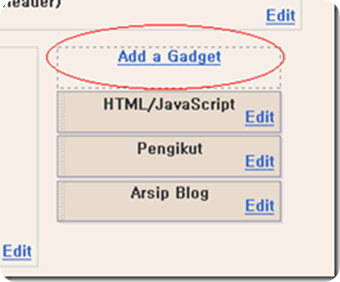
Then add this code in to it:
<ul class="basictab"><li class="selected"><a href="http://bdlab.blogspot.com">Home</a></li><li><a href="http://bdlab.blogspot.com/">Blogger Templates</a></li><li><a href="http://bdlab.blogspot.com/">Blogegr Tricks</a></li><li><a href="#">Edit</a></li><li><a href="#">Edit</a></li><li><a href="#">Edit</a></li><li><a href="#">Edit</a></li></ul>
 At the end of 2009 this year, leading Time magazine publishes about 10 things in 2009. For selected katergori gagdet, Droid development of Motorola. Motorola together with Verizon service, was selected as the best phone with the best network. Also TIME magazine also considered, Droid could provide another option to consumers.


